

How Craftware built a student service agent for SWPS University on the Salesforce platform
The bottleneck did not stem from the team’s lack of competence. It came down to arithmetic. The number of students is growing, along with their inquiries, but the day still has the same number of hours. In practice, this resulted in several difficulties.
First, most questions were repetitive. The answer was usually already in the regulations or a knowledge base article, but each time an employee had to find it, rewrite it, and adapt it to the specific student’s situation. Second, there was a lack of a common standard. Two employees could answer the same question differently: with a different tone, varying levels of detail, in a different structure, sometimes interpreting the same rule differently or emphasizing different issues. Third, the number of cases grew seasonally. During admissions, exam sessions, thesis defenses, and deadlines for submitting study-related applications, routine service turned into a bottleneck felt by both students and employees.
The cost of doing nothing was easy to predict. Maintaining the old model would sooner or later force the hiring of more people at the pace queries were growing. That would mean solving the scale problem by adding more hands to the work, rather than changing the way the work is done.
We didn’t sell the university a license with an attached user manual. We took responsibility for the entire transformation of the support process: from understanding how it truly works to its operation in production and further development. The solution covered three layers: audit and architecture, build and integration, and maintenance and development.
What sets our approach apart begins even before the first line of configuration. We do not connect artificial intelligence to disorganized data hoping it will somehow work out. We started by auditing and organizing the university’s knowledge base. During workshops, we assessed the quality of individual articles and prepared them so a machine could read them well. This isn’t just cosmetic. A model relying on incomplete or outdated content will provide equally incomplete and outdated answers. Moreover, it will do so with a fluent, convincing sentence that is hard to challenge. Organizing sources before launching an agent is the cheapest safeguard against incorrect answers. For the university, this meant accurate, source-backed answers right from the start.
The second rule is simple: as little code as possible, as many out-of-the-box platform mechanisms as possible. Salesforce provides many configuration tools, and we reach for those first. We write code where it truly solves a problem that configuration cannot. As a result, the system is cheaper to maintain and easier to develop. Besides, we think about maintenance from day one, not after implementation.
The third rule concerns the people who use the system. We didn’t confine all the logic to the IT department. We handed a part of it over to the employees. The implemented component allows them to independently create, organize, and launch their own commands for the agent. They can adapt its operation to the tasks they know best, without waiting for the next system release.
We treated the continuity of student service as a prerequisite, not a nice-to-have. That’s why we divided the implementation into short stages. At no point was the university left with a half-working system.
We released features gradually, stage by stage. One of them is an action that summarizes the student’s previous contacts with the university. The employee gets an immediate overview of the situation and doesn’t have to dig through archives of correspondence or cases. Such an early convenience works twofold: it genuinely relieves the team and builds trust in the tool before its more complex features are introduced.
We involved the university team in the work wherever their knowledge of the processes was irreplaceable. Everywhere else, we saved their time. Adoption is usually the hardest part of an AI implementation. Here, the solution itself helped: the agent shortened daily work and provided ready-made answer proposals, so employees quickly saw it as real support, not another obligation. It operated within a tool they already knew, and they launched it directly on records, without changing their existing habits.
This section is for those who ask not what we built, but how. I describe the architecture and patterns we used, skipping the configuration details specific to this university. We based everything on official Salesforce best practices for RAG in Agentforce.
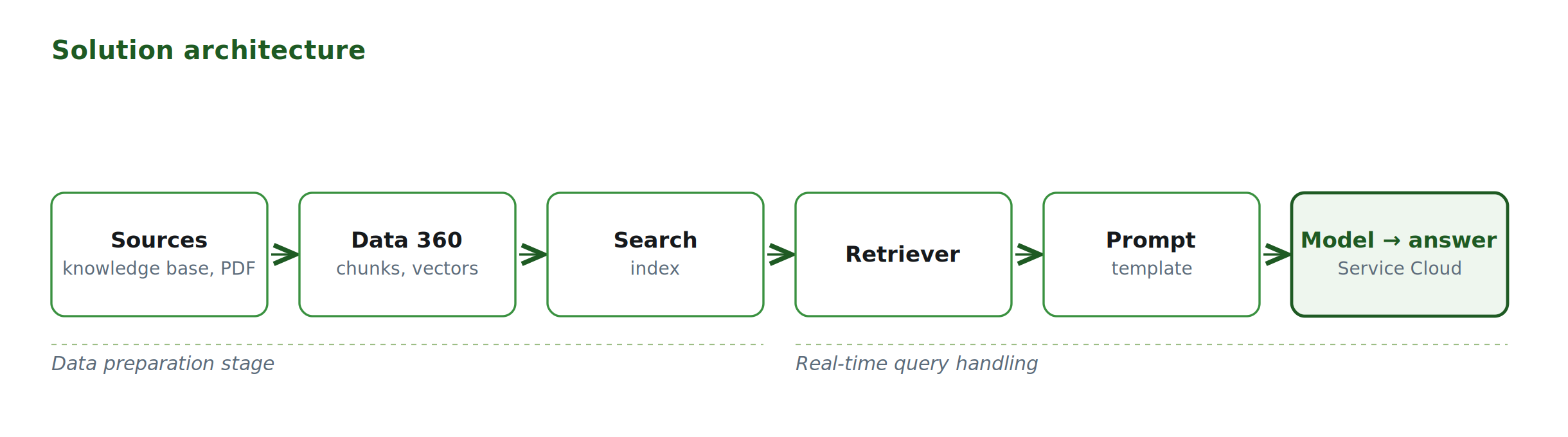
Fig. 1. The path from data sources to answers and actions in Service Cloud.
The Two Worlds of RAG: Preparation and Usage
RAG operates in two stages, separated in time. The first is the data preparation stage, performed before the solution is used and repeated after updating sources or the index. Data goes to Data 360, where the system divides it into fragments (chunks) and converts them into vectors—numerical representations of meaning that a machine can compare. The second stage happens in real-time, with each query. The Retriever receives a query from the prompt template, converts it into a vector, searches the index for the best-matching fragments, and adds them to the prompt. The enriched prompt goes to the language model, which formulates the answer. This seemingly simple sequence is the foundation for everything else.
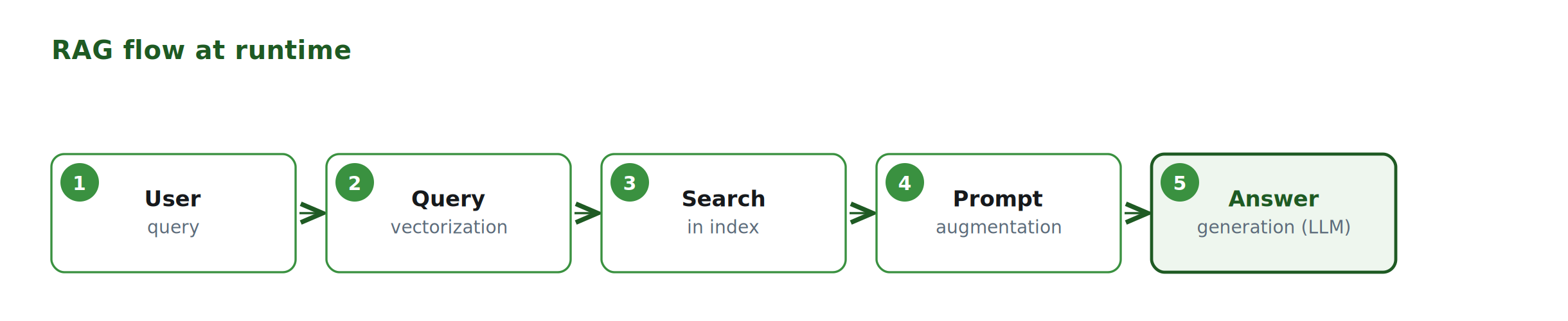
Fig. 2. Five steps that happen with every question.
Fast Track vs. Full Control: Agentforce Data Library vs. Data 360
Salesforce offers the shortest path to a working RAG: Agentforce Data Library. Adding such a library immediately creates a complete set of elements: data streams, data mappings, vector store, search index, retriever, prompt template, and agent action—all with default settings. It’s a good starting point, but it has limits. It can use Salesforce Knowledge articles, uploaded files, web search, or a custom retriever, but it offers fewer configuration options than manually preparing the solution in Data 360.
Where we needed more control over what and how the agent retrieves, we used manual configuration in Data 360. This aligns with our rule of using code only where truly necessary. We don’t multiply complexity unnecessarily, but we also don’t pretend that default settings are enough for every task.
Source Quality: Why the Knowledge Base Audit is a Technical Matter
Let’s return for a moment to the knowledge base workshops, because from an engineering perspective, they were not a side issue. The way an article is written directly determines whether the agent will find it and understand it correctly. Good content is specific and detailed. It contains real examples, logically connected paragraphs, and meaningful headings. Lengthy information is broken down into separate fields: the question separately, the description separately, the solution separately. Add to this hygiene: regular reviews and versioning. A knowledge base that no one maintains becomes misleading after a year. Organizing content is therefore not a stage before the actual technical work. It is the actual technical work.
Search Index and the Four Roles a Field Can Play
When building an index, Data 360 divides the content into chunks and converts them into vectors. A single vector cannot convey the meaning of an entire long document, so each chunk carries one coherent, self-contained fact. When designing an index, each field must consciously be assigned one of four roles:
- Indexed fields — the system divides them into chunks and vectorizes them; these are the ones that take part in semantic search, and only they are searched semantically.
- Prepend fields — the system attaches them to the beginning of each chunk to make it easier to identify where a given fragment comes from; they are not searched but provide context.
- Filter fields — they go into the index without vectorization and are strictly used to narrow down results by a specific value, such as document type.
- Return fields — we indicate them at the retriever level; their content returns to the prompt as material for the model.
There is a trap here. It’s tempting to index fields containing just categories, but they produce short fragments without context and ruin the search. Categories work better as prepend fields rather than indexed fields.
Hybrid Search and the Bilingual Issue
In practice, we can choose between two approaches. Vector search (semantic search) compares meaning and therefore understands paraphrases—it knows that “how to log in” and “how to access the account” ask for the same thing, but it can be deaf to exact proper names, numbers, and terms. Keyword search (lexical search) works the other way around: it looks for exact string matches, so it handles terms and numbers perfectly but loses synonyms and circumlocutions. Hybrid search combines both—taking semantic relevance from vectors and precision from word matching. That’s why, where precision mattered, we reached for it. It comes at a cost: it increases relevance but also increases latency and resource consumption, so we use it consciously, not automatically everywhere.
A separate thread, important for the university, is multilingualism. Regulations and some correspondence are in Polish, while other content is in English. The multilingual vector model preserves the similarity of meanings between languages. A question in Polish can therefore find relevant content written in English and vice versa. When the answer must remain in one language, the language can be enforced with a filter.
You won’t find percentages or amounts here. Instead of promising an accuracy that we haven’t reliably measured yet, we will describe the change as it looks in daily work.
It is most visible in terms of time. Preparing an answer for a student no longer requires writing it from scratch every time. In a matter of seconds, the agent drafts a response based on the university’s sources. The answer is not published automatically: an employee of the Student Affairs Center reviews it, completes it if necessary, and makes the final decision to send it. The agent remains a tool supporting the team, and the saved time can be allocated to individual, more complex cases requiring consultation with several offices.
The second change concerns insight. The employee no longer reconstructs the student’s history from scattered cases and messages but immediately receives a summary of it. The third change concerns consistency: draft answers draw from the same organized sources, and their final shape and dispatch remain in the hands of the employee. Thanks to this, the Student Affairs Center can handle repetitive questions more efficiently while preserving time for cases that require an individual approach.
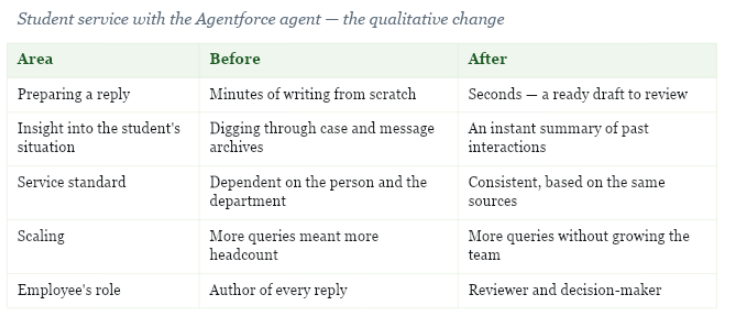
We will show more comprehensive data when the measurement covers mature usage across subsequent service areas.
A PDF file with the full version of the Case Study will be available here soon. In it, among other things:
- Executive Summary
- Overview of the student lifecycle
Presentation of additional implementation stages:
- Retrievers, filters, and the limits of point-and-click configuration
- Ensemble retriever, or the knowledge base and files in one stream
- RAG in the context of a single record
- Actions, or the agent’s hands
- How we verify that it really works
Author

Dominik Gniediuk
Salesforce Presales & Innovation Consultant at Craftware.
Nearly 10 years of experience in the Salesforce ecosystem – from Solution Architect and Product Owner, to a technical consultant delivering end-to-end projects. Currently, I support companies in adopting artificial intelligence, combining an analytical approach to processes with the potential of Agentforce. I help turn the AI vision into an implementation roadmap that truly transforms the business.
